Pages

Blog post updated : no update

Friday, June 22, 2007

6 fun Firefox games you should play

If you're really Firefox's fan, you'll never want to miss this one. Yeahhh..it's fun. But, before that, do you have already finish the Google game? It's so hard, right? Hehee..

Ok, now, let's fun!!!

Requirements : Firefox with javascript enabled.

Game 1

Name : Tic Tac Toe
Play Now! : vs Computer | 2 Player
Screenshot(s) :

Game 2

Name : Mozilla Jigsaw Puzzles
Play Now! : Mozilla | Firefox | Thunderbird | Sea Monkey
Play Offline : Download
Screenshot(s) :

Game 3

Name : Mozilla Memory Game
Play Now! : Memory Game
Screenshot(s) :

Game 4

Name : Mozilla Drop Game
Play Now! : Drop Game
Screenshot(s) :

Game 5

Name : Firefox Connect 4
Play Now! : 2 Player
Screenshot(s) :

Game 6

Name : Browser War Checkers
Play Now! : vs Computer
Screenshot(s) :

Do you have any fun Firefox games to share? Feel free to drop a comments.:-)

Credits : Mouse Runner.com, 7is7.com

Thursday, June 21, 2007

Firefox Addons - Basic things you should know


What are Add-ons?

Add-ons are small pieces of software that can add new features or tiny tweaks to your Firefox. There are five types of Firefox Add-ons; extensions, themes, dictionaries, search engines and plugins.

Extensions

Extensions are small add-ons that add new functionality to Firefox, from a simple toolbar button to a completely new feature. They allow you to customize Firefox to fit your own needs and preferences, while letting us keep Firefox itself light and lean.


Themes

Themes are like new clothes for your Firefox. A theme can change only a few colors, or every piece of Firefox's appearance. It's another great way to personalize Firefox to your tastes.


Dictionaries

These dictionaries work with the spell-checking feature in Firefox.


Search Engines

Add these search engines to the Search Bar in the upper-right corner of Firefox, for quick access to your favorite search sites.


Plugins

Plugins help your browser perform specific tasks like viewing special graphic formats or playing multimedia files. Plugins are slightly different from extensions, which modify or add to existing functionality.


Hmm..I think that I should post this entry earlier than this one. But, never mind. I hope that this basic information are really useful for you.

Credits : Firefox Add-ons

Wednesday, June 20, 2007

Gwigle - Google game

Do you use Google everyday? Ok, check out this game. Gwigle was created by a Google employee. It asks you to guess the query by looking at the first search results. It's quite difficult to guess the queries and honestly I got stuck on level 1.3..hehehee

Gwigle screenshot(s):


Answer (In case you got stuck. Hehehe):


Credit(s): Google System

Tuesday, June 19, 2007

Split and join your files with HJ-Split

Currently, I'm using HJ-Split to split my files. Simple, easy and supports many platforms. It's a freeware file-splitting programs created by Freebyte.com.

HJ-Split Screenshot(s):
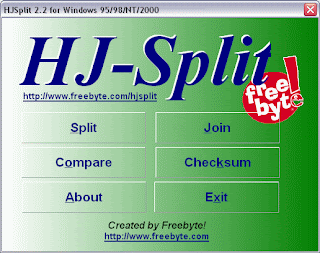

You can download it at Download.com.

Updates:

[01/19/08]
Some of you guys has looking the tutorial on how to use HJ-Split in Google. Ok, I'll show how simple it is to use this software.

How to split a file using HJ-Split?

Let say you have downloaded a movie file from your office that have 800MB in size. Ok, we call it Newmovie.avi. You want to bring it home and you have 2 CD-Rs with you. Now, follow these steps:-

Step 1

Run HJ-Split and click the Split button, and you'll see a red-white popup window. Then, click the Input file button and locate the Newmovie.avi file that we want to split. Set file size to 500 Mbytes.

Step 2

Finally, click the Start button. Wait until the process finished. DONE.

By now you should have two split files that called Newmovie.avi.001 and Newmovie.avi.002. Newmovie.avi.001 will have 500MB in size and Newmovie.avi.002 will have 300MB in size. Now you can burn it into your CD-R.


Then, how to join a file using HJ-Split?

Ok, you already at home right now and have 2 CD-Rs consist Newmovie.avi.001 and Newmovie.avi.002 file. Copy them to your Desktop or any folder. Make sure you copy and paste them in the same folder or location. Follow these steps to join your files:-

Step 1

Run your HJ-Split, click the Join button and you'll see the purple-white popup window. Click Input file button and locate the Newmovie.avi.001 file.

Step 2

Click the Start button and wait until finished. DONE.

The joined file will be located in the same location you place the Newmovie.avi.001 file. Right now you should be able to watch your favorite movie at your own computer.

Note: HJ-split is also useful if you want to upload a large file to Google Pages, since it only can handle 10MB/upload file.

Hope this is useful for you guys!!!

Sunday, June 17, 2007

Safari for Windows?

Woww...this one is really great. Apple have already released a Safari browser for Windows. It's a beta version. By the way, I have installed it in my system. Take a look on how my blog displayed in this browser.

Check this out:-


It's cool right? Why don't you grab it now. Come on, I really need some feedback from you guys...:)

Saturday, June 16, 2007

XP Registry - Speed up shutdown time

Do you any problem on Windows shutdown time? Ok, here are a couple of steps you can take to speed up your Windows XP shutdown process.

Step 1

Paging file (pagefile.sys) - Don't have XP clear at shutdown.

The paging file is used to store temporary files and data, but when your system shuts down, information stays in the file. Some people prefer to have the paging file cleared at shutdown, because sensitive information such as unencrypted passwords sometimes ends up in the file. However, clearing the paging file can slow shutdown times significantly, so if extreme security isn't a high priority, you might not want to clear it. To shut down XP without clearing your paging file, run the Registry Editor and go to:

HKEY_LOCAL_MACHINE\SYSTEM\CurrentControlSet\Control\Session Manager\Memory Management


Change the value of ClearPageFileAtShutdown to 0. Close the Registry and restart your computer. Whenever you turn off XP from now on, the paging file won't be cleared, and you should be able to shut down more quickly.

Step 2

Reduce the amount of time Windows will take to kill open applications on shutdown.

Part 1 - Go to :

HKEY_CURRENT_USER\Control Panel\Desktop\


Change the value of WaitToKillAppTimeout to 1000. And then,


change the value of HungAppTimeout to 1000 also.


Part 2 - Go to :

HKEY_USERS\.DEFAULT\Control Panel\Desktop

Change the value of WaitToKillAppTimeout to 1000. And then,

change the value of HungAppTimeout to 1000 also.


Part 3 - Go to:

HKEY_LOCAL_MACHINE\System\CurrentControlSet\Control\

Change the value of WaitToKillServiceTimeout to 1000.


Step 3

Non-responsive applications - Allow XP to close it automatically upon shutdown

Go to:

HKEY_CURRENT_USER\Control Panel\Desktop

Change the value of AutoEndTasks to 1.

So, how was it for you? I hope you find this tips really useful. On next entry, I will show you how to speed up XP boot time. Yeahhhh!!!!!!!!!!

Friday, June 15, 2007

Windows XP - Run commands


This is the great list for those who'd like to run any application/program on Run (Windows + R). It's a looooonng list. Are you ready? Ok, Let's go!!

Accessibility Controls
access.cpl

Add Hardware Wizard
hdwwiz.cpl

Add/Remove Programs
appwiz.cpl

Administrative Tools
control.exe admintools

Automatic Updates
wuaucpl.cpl

Bluetooth Transfer Wizard
fsquirt

Calculator
calc

Certificate Manager
certmgr.msc

Character Map
charmap

Check Disk Utility
chkdsk

Clipboard Viewer
clipbrd

Command Prompt
cmd

Component Services
dcomcnfg

Computer Management
compmgmt.msc

Date and Time Properties
timedate.cpl

DDE Shares
ddeshare

Device Manager
devmgmt.msc

Direct X Control Panel (if installed)*
directx.cpl

Direct X Troubleshooter
dxdiag

Disk Cleanup Utility
cleanmgr

Disk Defragment
dfrg.msc

Disk Management
diskmgmt.msc

Disk Partition Manager
diskpart

Display Properties
control.exe desktop

Display Properties
desk.cpl

Display Properties (w/Appearance Tab Preselected)
control.exe color

Dr. Watson System Troubleshooting Utility
drwtsn32

Driver Verifier Utility
verifier

Event Viewer
eventvwr.msc

File Signature Verification Tool
sigverif

Findfast
findfast.cpl

Folders Properties
control.exe folders

Fonts
control.exe fonts

Fonts Folder
fonts

Free Cell Card Game
freecell

Game Controllers
joy.cpl

Group Policy Editor (XP Prof)
gpedit.msc

Hearts Card Game
mshearts

Iexpress Wizard
iexpress

Indexing Service
ciadv.msc

Internet Properties
inetcpl.cpl

Java Control Panel (if installed)
jpicpl32.cpl

Java Control Panel (if installed)
javaws

Keyboard Properties
control.exe keyboard

Local Security Settings
secpol.msc

Local Users and Groups
lusrmgr.msc

Logs You Out Of Windows
logoff

Microsoft Chat
winchat

Minesweeper Game
winmine

Mouse Properties
control.exe mouse

Mouse Properties
main.cpl

Network Connections
control.exe netconnections

Network Connections
ncpa.cpl

Network Setup Wizard
netsetup.cpl

Nview Desktop Manager (if installed)
nvtuicpl.cpl

Object Packager
packager

ODBC Data Source Administrator
odbccp32.cpl

On Screen Keyboard
osk

Opens AC3 Filter (if installed)
ac3filter.cpl

Password Properties
password.cpl

Performance Monitor
perfmon.msc

Performance Monitor
perfmon

Phone and Modem Options
telephon.cpl

Power Configuration
powercfg.cpl

Printers and Faxes
control.exe printers

Printers Folder
printers

Private Character Editor
eudcedit

Quicktime (If Installed)
QuickTime.cpl

Regional Settings
intl.cpl

Registry Editor
regedit

Registry Editor
regedit32

Removable Storage
ntmsmgr.msc

Removable Storage Operator Requests
ntmsoprq.msc

Resultant Set of Policy
rsop.msc

Resultant Set of Policy (XP Prof)
rsop.msc

Scanners and Cameras
sticpl.cpl

Scheduled Tasks
control.exe schedtasks

Security Center
wscui.cpl

Services
services.msc

Shared Folders
fsmgmt.msc

Shuts Down Windows
shutdown

Sounds and Audio
mmsys.cpl

Spider Solitare Card Game
spider

SQL Client Configuration
cliconfg

System Configuration Editor
sysedit

System Configuration Utility
msconfig

System File Checker Utility
sfc

System Properties
sysdm.cpl

Task Manager
taskmgr

Telnet Client
telnet

User Account Management
nusrmgr.cpl

Utility Manager
utilman

Windows Firewall
firewall.cpl

Windows Magnifier
magnify

Windows Management Infrastructure
wmimgmt.msc

Windows System Security Tool
syskey

Windows Update Launches
wupdmgr

Windows XP Tour Wizard
tourstart

Wordpad
write

Updates:

[01/17/08]

Mozilla Firefox
firefox

Optionally
firefox google.com/ig

IP Configuration (Display Connection Configuration)
ipconfig /all

IP Configuration (Display DNS Cache Contents)
ipconfig /displaydns

IP Configuration (Delete DNS Cache Contents)
ipconfig /flushdns

IP Configuration (Release All Connections)
ipconfig /release

IP Configuration (Renew All Connections)
ipconfig /renew

IP Configuration (Refreshes DHCP & Re-Registers DNS)
ipconfig /registerdns

IP Configuration (Display DHCP Class ID)
ipconfig /showclassid

IP Configuration (Modifies DHCP Class ID)
ipconfig /setclassid

Notepad
notepad

Remote Desktop
mstsc

System File Checker Utility (Scan Once At Next Boot)
sfc /scanonce

System File Checker Utility (Scan On Every Boot)
sfc /scanboot

System File Checker Utility (Return to Default Setting)
sfc /revert

System File Checker Utility (Purge File Cache)
sfc /purgecache

System File Checker Utility (Set Cache Size to size x)
sfc /cachesize=x

Wordpad
wordpad

Fuhhh....did I miss anything? Feel free to drop any comment if you have any other windows run commands to share.:-)

Thursday, June 14, 2007

Blogger - Hide top navigation bar

Ok, just a simple tips for today. It's really easy to hide the navigation bar(image above) and this code is working on new blogger. Open your HTML page on Template tab and copy/paste this CSS code before body { :-

#navbar-iframe {
display: none;
}

Update:

[07/14/07]
This tricks is no longer works. You can replace them with either these two codes:

Code 1:

#navbar-iframe {
height: 0px;
}

Code 2:

#navbar-iframe {
visibility: hidden;
}

[01/14/08]
You also can use this code. Ionut Alex Chitu has applied this code in his blog.

#navbar-iframe {
display:none !important;
}

Save your template and refresh your blog. Tadaa!!! Your navigation bar is gone!!

Credits : Tips for New Blogger

Wednesday, June 13, 2007

Firefox 3.0 Alpha - What do you think?

Firefox 3.0 Alpha 5 was just released. Or should I say Gran Paradiso Alpha 5. Hmm..I think it's just a code name. Anyway, I have already installed it in my system and there is nothing different in Firefox browser interface. Maybe soon. Besides, it's just for testing purposes only.

Feel free to download it. :)
 
Powered by Blogger